Home Start: Volunteer Management

Reimagining volunteer management by replacing manual workflows with a centralized management system.

Role:

Product Designer

Team:

3 Designers, 8 Developers, PM & EM

Industry:

NGO / Nonprofit Operations

Tools:

Figma

Timeline: Nov 2025 - Feb 2026

Role:

Product Designer

Team:

3 Designers, 8 Developers, PM & EM

Industry:

NGO / Nonprofit Operations

Tools:

Figma

Timeline: Nov 2025 - Feb 2026

Duration:

4 Weeks

Home Start is a San Diego–based nonprofit supporting families through housing, domestic violence services, and other essential programs. Behind each event is a single coordinator managing a large, fully in-person volunteer network.

Home Start is a San Diego–based nonprofit supporting families through housing, domestic violence services, and other essential programs. Behind each event is a single coordinator managing a large, fully in-person volunteer network.

The Problem

Manasi, Home Start's manager, worked 20 hours per week, but that number spiked to 30–50 hours before major events.

75% of her time was spent on sending messages.

75% of her time was spent on sending texts.

75% of her time was spent sending texts.

Manasi managed volunteers across disconnected tools: tracking records in Excel, drafting messages in Notes, and manually texting each person individually due to privacy constraints. Manual personalization created significant time overhead and human error risk.

Manasi managed volunteers across disconnected tools. Manual personalization created significant time overhead and human error risk.

The Solution

How might we help Home Start centralize volunteer data and deliver personalized, privacy-safe communication at scale?

  1. Privacy-Safe Messaging

  1. Privacy-Safe Messaging

The system allows the coordinator to write one message and send it to a selected group, delivering it as individual texts to each volunteer so phone numbers remain private while maintaining a personal feel.

Select & Filter Volunteers

Select & Filter Volunteers

A search and tag-based filtering allows for segmenting volunteers by event, role, or program.

Personalize at Scale

Personalize at Scale

Templates include dynamic fields that automatically customize each message for every recipient.

  1. Centralized Volunteer Database

All volunteer information (contact details, roles, tags, and history) lives in one searchable system, enabling easy imports, filtering, and profile updates without external spreadsheets.

CSV Migration

Import & export existing spreadsheets and updated records, streamlining data transition and reporting.

Tag System & User Profiles

View, manage, and filter tags dynamically to keep volunteer segments precise and actionable.

  1. Centralized Volunteer Database

  1. Central Volunteer Matrix

All volunteer information (contact details, roles, tags, and history) lives in one searchable system, enabling easy imports, filtering, and profile updates without external spreadsheets.

CSV Migration

CSV Migration

Import & export existing spreadsheets and updated records, streamlining data transition and reporting.

Tag System & User Profiles

View, manage, and filter tags dynamically to keep volunteer segments precise and actionable.

Research & Process

Key Insights

Our discovery process incorporated client-led workflow walkthroughs, cross-channel artifact audits, biweekly client check-ins, and constraint mapping across privacy, operational, and technical realities. Our findings included:

Manual segmentation was a key barrier.

Manual segmentation was a key barrier.

1

Privacy constraints hindered bulk messaging.

2

Personalization directly drove engagement.

Personalization directly drove engagement.

3

Competitive Positioning

Competitive Positioning

Bloomerang

GivePulse

Salesforce

Mailchimp

Neon One

Bloomerang

GivePulse

Salesforce

Mailchimp

Neon One

Bloomerang

GivePulse

Salesforce

Mailchimp

Neon One

Market Landscape:

  • Volunteer self-service portals

  • Feature-heavy CRM workflows

  • Multi-admin organizations

Home Start Needs:

  • Single operator

  • High personalization

  • Spreadsheet interoperability

Market Landscape:

  • Volunteer self-service portals

  • Feature-heavy CRMs

  • Multi-admin orgs

Home Start Needs:

  • Single operator

  • High personalization

  • Spreadsheet interoperability

Market Landscape:

  • Volunteer self-service portals

  • Feature-heavy CRMs

  • Multi-admin orgs

Home Start Needs:

  • Single operator

  • High personalization

  • Spreadsheet interoperability

Constraints & Tradeoffs

Constraints & Tradeoffs

Full CRM vs spreadsheet-native model chose lightweight model to reduce admin friction

SMS compliance vs personalization depthautomated dynamic templates while respecting privacy

Manual segmentation vs automationautomated filtering to streamline data access

Full CRM vs spreadsheet-native lightweight model, reduce admin friction

SMS compliance vs personalizationdynamic templates, maintain privacy

Manual segmentation vs automationautomated filtering kept personal touch

Full CRM vs spreadsheet-native lightweight model, reduce admin friction

SMS compliance vs personalizationdynamic templates, maintain privacy

Manual segmentation vs automationautomated filtering kept personal touch

Design Principles

  1. Automation of workflow

  2. Privacy and personalization

  3. Zero technical overhead

Core System Model

  1. Structured tagging model

  2. Broadcast-based SMS engine

  3. Lightweight data schema

Feedback & Iterations

Following usability testing, I synthesized feedback into two themes: visual clarity and workflow friction. I prioritized high-impact improvements to hierarchy, consistency, and bulk actions to reduce operational complexity. Here's a glimpse:

Design Principles

  1. Automation of workflow

  2. Privacy and personalization by default

  3. Zero technical overhead

  1. Automation of workflow

  2. Privacy & personalization

  3. Zero technical overhead

  1. Structured volunteer tagging model

  2. Broadcast-based SMS engine

  3. Lightweight data schema

Core System Model

  1. Structured volunteer tagging

  2. Broadcast-based SMS engine

  3. Lightweight data schema

  1. Structured volunteer tagging model

  2. Broadcast-based SMS engine

  3. Lightweight data schema

Feedback & Iterations

Feedback & Iterations

Following usability testing, I synthesized feedback into two themes: visual clarity and workflow friction. I prioritized high-impact improvements to hierarchy, consistency, and bulk actions to reduce operational complexity. Here's a glimpse:

Pop up blends too much with background.

Needs a way to select/deselect all recipients

Needs more visual consistency with rounding, borders, etc.

What does the pencil mean? There is a mental disconnection w/ selecting users.

A bit jarring that the "To" icon leads to a separate page.

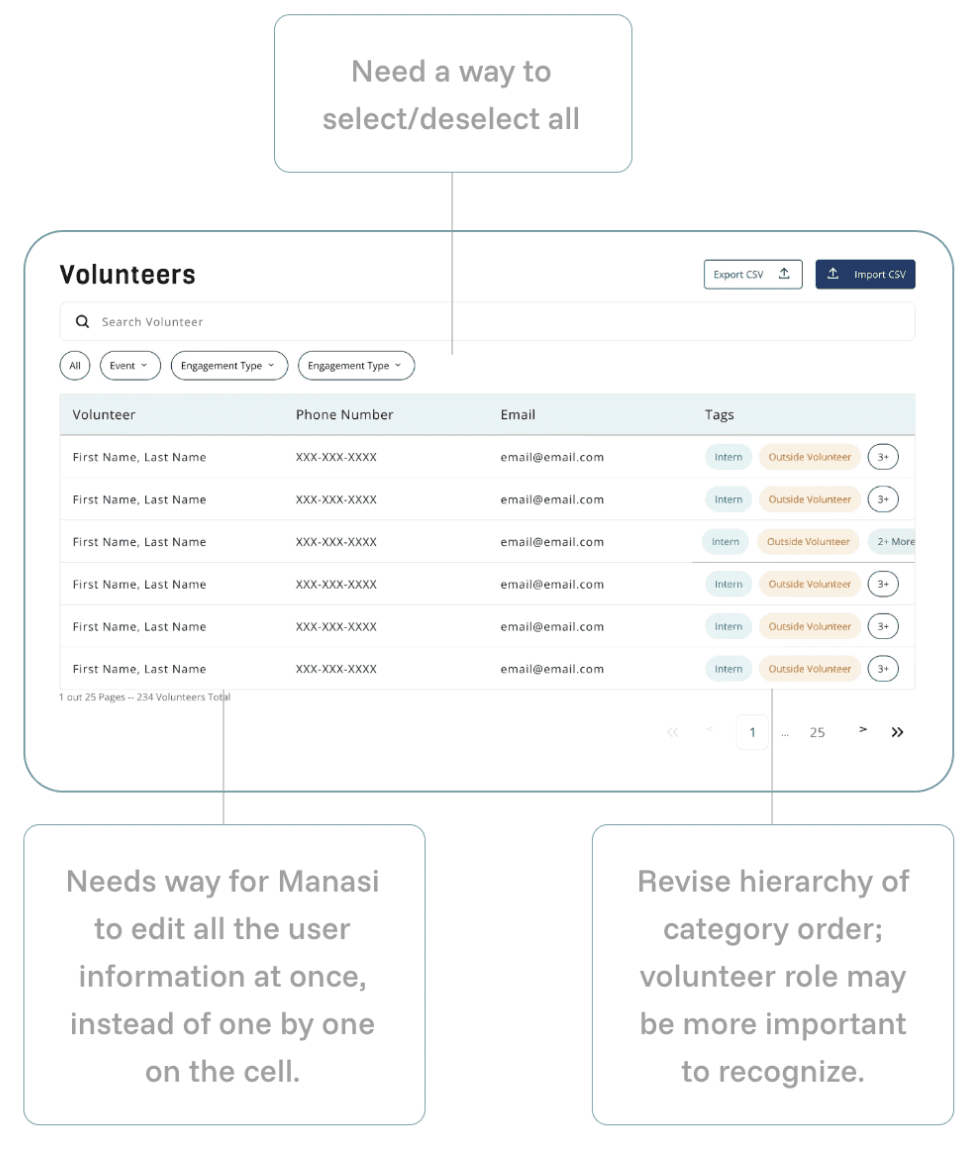
Need a way to select/deselect all

Needs way for Manasi to edit all the user information at once, instead of one by one on the cell.

Revise hierarchy of category order; volunteer role may be more important to recognize.

Key Takeaways!

Key Takeaways!

This project reinforced that strong product design starts with understanding how people actually work. By embedding in Manasi's daily workflow, we uncovered the real bottlenecks and redesigned the system around them, reducing manual effort by ~75% while preserving personal outreach. We used constraints to shape our solution rather than limit it!

Delivery & What's Next

Delivery & What's Next

Upon completing the design phase, all visual and interaction components of our product MVP were finalized and handed off to the development team. The current roadmap targets full deployment of the mobile-friendly dashboard by Q2 2026, with advanced features such as analytics, templates, and scheduled messaging to follow in subsequent V2 releases.
Check out another?

Check out another?

Create a free website with Framer, the website builder loved by startups, designers and agencies.